Run any workload on every GPU you can reach.
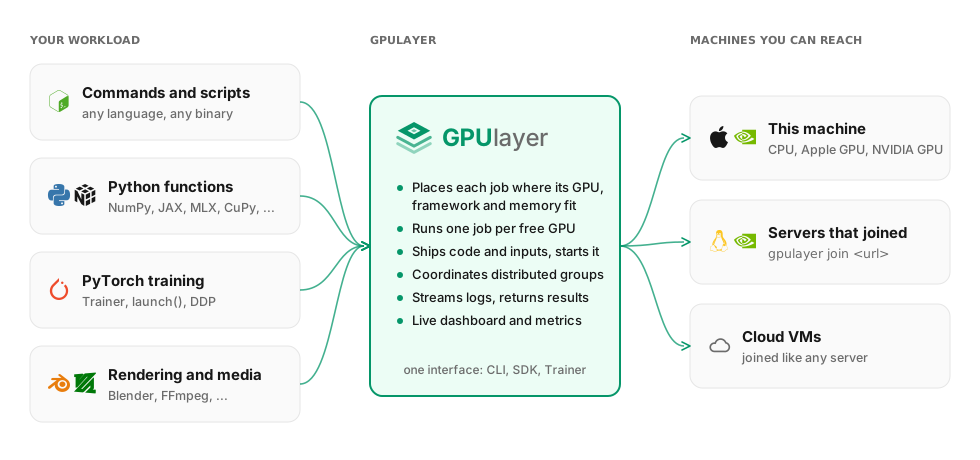
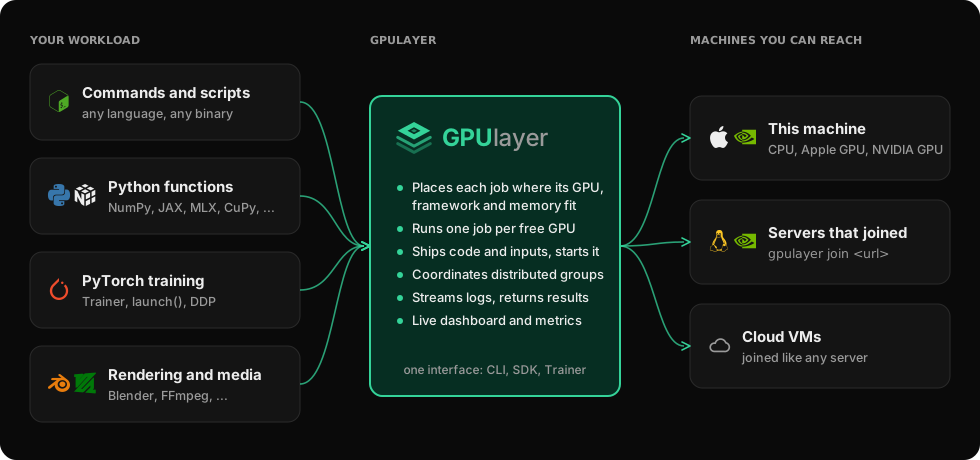
GPUlayer sits between your code and your GPUs: your laptop, remote servers, clusters, data centers and cloud VMs. Commands, Python functions and distributed jobs go to a machine that can run them, and the results come back.
Quickstart
From one machine to all of your GPUs
Start on your laptop with nothing to set up. Add machines when you need them.
No server, no account. GPUlayer runs a control plane and a worker inside your process.
- 1
Install
Python 3.10 or newer. PyTorch is optional for the core.
$ git clone https://github.com/antonellof/gpulayer && cd gpulayer$ uv venv && source .venv/bin/activate && uv pip install -e '.[dev,examples]' - 2
See what this machine offers
GPUs come from the driver or platform; frameworks from the Python that runs jobs.
$ gpulayer resources detecthost my-mac (darwin/arm64), 10 cores, 32.0 GB RAMdevice [0] mps Apple arm64 GPU (Metal) (32.0 GB unified) - 3
Run any command as a job
Inputs are staged, output files come back, logs stream to your terminal.
$ gpulayer submit --source examples/shell_job \--input examples/shell_job/sales.csv:sales.csv -- bash report.shrunning on my-mac, accelerator=cpueast,99.99job-88eeb3960503 succeeded - 4
Train PyTorch, then scale the same file
One process, then DDP on two processes. Only the flags change.
$ python examples/trainer_regression/train.py$ python examples/trainer_regression/train.py \--accelerator cpu --devices 2[gpulayer] training on mps, precision 32-true, 5 epoch(s)[gpulayer] job-5cc477d4ffad succeeded; 2 output file(s) in gpulayer_runs/job-5cc477d4ffad
Capabilities
What GPUlayer handles for you
Any command
Scripts and binaries in any language run as jobs, with inputs staged and output files returned.
Any library
PyTorch, JAX, MLX, CuPy and NumPy are detected on each worker and required per job.
Any machine you can reach
Your laptop, servers that join with one command, cloud VMs. NVIDIA CUDA and Apple Metal.
Distributed when needed
Worker groups are placed together, with ranks and rendezvous set up. Launched with torchrun.
Results come back
Logs stream while a job runs. Output files and checkpoints download when it ends.
PyTorch integration
A small Trainer, launch() for existing scripts, and helpers for devices, DDP and precision.
Placement
Every decision comes with a reason
Workers report their GPUs, memory, drivers and installed frameworks. Each job goes to a worker that has what it asks for. When none does, it is rejected before it starts, and you see why for every worker.
scheduling: no eligible worker
  gpu-box-1    needs 2 usable cuda device(s), worker has 1
  mac-studio   framework 'jax' not installed
  laptop       torch on this worker cannot use CUDA
  gpu-box-2    eligible
Positioning
The layer underneath your framework
Frameworks decide how a computation uses the hardware they are given. GPUlayer decides which hardware runs it, gets code and data there, starts it, and returns the results.
Uses Modal's own GPUs
Before and after
With and without GPUlayer
| Without | With GPUlayer | |
|---|---|---|
| Code on a laptop, GPU somewhere else | ssh, copy code, rebuild the environment, run in tmux, copy results back | gpulayer submit --target remote -- <cmd> |
| Several GPU machines | track free machines by hand; jobs crash on the wrong GPU, driver or library | one queue; each job lands where it fits, or is rejected with the reason |
| NVIDIA boxes and Apple Silicon Macs | separate scripts and setup per machine | ask for cuda or mps; one interface for both |
| A batch of independent tasks | loops and ad-hoc scripts | fn.map([...]) in parallel across free workers |
| Multi-node training | torchrun on every node with matching ranks, address and port | Trainer(num_nodes=2, devices=4) |
On a single machine with a single GPU, running your code directly is simpler. GPUlayer runs jobs that finish (long-running services are planned) and is meant for people who trust each other. When to use it
Architecture
One job model and one scheduler for every environment
Workers poll the control plane, so they can sit behind NAT. Code travels as source bundles and functions are called by name. The control plane runs inside your process or as a small self-hosted server.
Status
What works today
Each capability is labelled by how it has been tested so far.
- Tested
- Local execution, SDK and CLI · scheduling · servers and workers over HTTPS (one host) · DDP, 2 nodes × 2 processes (one host) · MLX, NumPy and shell jobs
- Hardware-validated
- Apple Metal (MPS), single-process jobs
- Implemented, not validated
- NVIDIA CUDA and NCCL · workers on separate machines
- Simulated
- Cloud provisioning (FakeProvider)
- Planned
- A real cloud provider · long-running services · hosted control plane
Try it on your own machines
The quickstart takes about fifteen minutes: a shell job, a NumPy job, then one PyTorch file trained in several places.